
Since we had mastered the 9-axis hardware miniaturisation , I wanted to push the limits of our team to test their fit with a new product – Mouse 2 ( A mouse HCI device re-imagined to help CAD/CAM and DESIGN creators ).
It was necessary to test my assumptions before we start creating a prototype of Mouse 2 is there any algorithm that just turns a 9-axis motion sensor into a flawless air mouse? Because if one already exists, we’re fools to build all this. An IMU does not measure where it is. It measures angular velocity (the gyro) and specific force — acceleration plus gravity (the accelerometer) — with the magnetometer adding a compass heading. From those, some things are observableand some are simply not. Orientation is observable: gravity gives you an absolute reference for tilt (pitch and roll), and the magnetometer gives you an absolute reference for heading (yaw), so a good fusion filter can hold your orientation steady over time. But absolute position is not observable. To get position from acceleration you must integrate twice, and integrating the accelerometer’s ever-present noise makes the estimated position drift away quadratically — within a couple of seconds the cursor has sailed off the screen.And even with perfect sensing, you’re left with two human-factors problems no filter solves cleanly: hand tremor (an 8–12 Hz shake that turns into cursor buzz) and the mapping itself — how much hand motion equals how much cursor motion, and how that gain should curve for both pixel-precise targeting and fast screen-crossing. Tune the filter to kill jitter and it feels laggy; tune it to feel responsive and the tremor comes through. There’s no single setting that’s flawless, because the trade-offs are baked into the sensors, not the code.
The Teacher Model
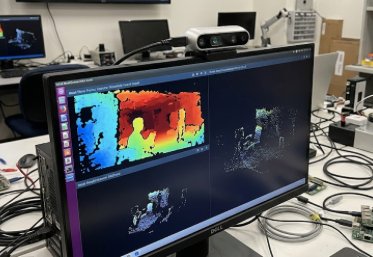
We ordered the best stereo cam in our budget at that time an Intel D400 , if i remember correctly – This rig had 90 FPS — our sensor was set at 500 Hz , a classic sensor fusion mismatch , Still better than 30 FPS on Kinect V2 available at that time. The first thing we did was create an application by programming D400 to register the finger tip of Index finger as a HCI input for the 2D screen . The loop was simple. Grab a synchronized depth+color pair, align depth to color, then segment the hand by depth — carve out everything nearer than a threshold, so the hand pops from the background regardless of lighting (no fragile color/white-dot tracking). Find the fingertip on that blob, then deproject it: pixel + depth + camera intrinsics → a real metric point (x, y, z) in millimetres. A calibrated mapping flattened that onto the screen. A dot chasing my finger through the air — and because we had depth, it even knew when I pushed toward the screen, which no webcam could.
Ground truth : Now we did our magic trick , mounted an IMU over the finger tip , Now we had the (x,y,z) from Intel camera — and (x,y) of the screen . So while training a model we would have loss-function to calibrate.The network took raw IMU signals in, output a cursor position, and the loss punished the distance to the ground-truth target (the camera’s position in screen coordinates). Minimizing it forced the weights to absorb both jobs at once — the IMU-to-motion physics and the world-to-screen calibration. The geometry wasn’t a separate step bolted on; it dissolved into gradient descent.
Knowledge Distillation vs Pruning
Once we had a teacher model , the compute for the teacher model was carried out on the PC and not the MCU that went with IMU , we now had to choose between Pruning and Knowledge Distillation . Pruning our teacher and trying to compress it –did not work to fit in 256 KB ram that our MCU offered.
Pruning and knowledge distillation both shrink a model, but differently: pruning trims the model you already have — cutting low-importance weights or channels and fine-tuning — so you keep the same architecture, get modest reductions (~2×) cheaply, but hit a wall on big shrinks (accuracy collapses) and can’t change the model’s fundamental shape. Distillation grows a new, smaller model that imitates the big one, so it costs more effort (a full student training run) but gives architectural freedom, degrades gracefully at large reductions (10–50×), and can do things pruning can’t — like turning a bidirectional teacher into a causal student. For Mouse 2, pruning won early skirmishes but couldn’t reach 256 KB without breaking; distillation won the war at 45 KB, causal and smooth. They’re also combinable: the strongest pipelines distill first, then prune, then quantize.
I thank Harman Farwah for working with me on this challenge .